
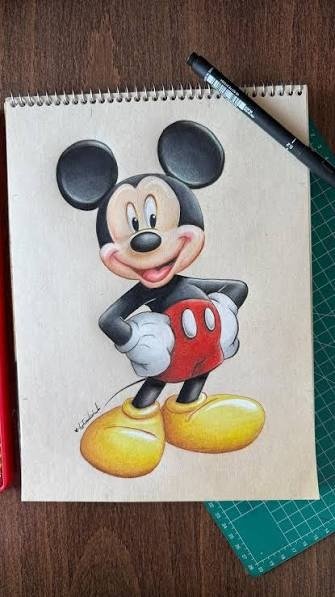
A Mickey Mouse drawing is one of the best ways to practice cartoon art. Mickey Mouse has been loved by generations because of his simple design, expressive face, and cheerful personality. Whether you’re a beginner, a student, or an experienced artist looking for a fun sketching project, learning to draw Mickey Mouse is enjoyable and rewarding.
In this guide, you’ll learn step-by-step instructions, helpful drawing tips, creative ideas, and mistakes to avoid so you can create an impressive Mickey Mouse drawing with confidence.
Why Draw Mickey Mouse?
There are many reasons why artists love drawing Mickey Mouse:
- Simple circular shapes make him easy to sketch.
- Perfect for beginners learning cartoon drawing.
- Great practice for facial expressions.
- Fun activity for kids and families.
- Excellent subject for coloring and digital art.
Because the character is made from basic geometric shapes, almost anyone can learn to draw him.
Materials You’ll Need
Before starting your Mickey Mouse drawing, gather these supplies:
- Pencil
- Eraser
- Drawing paper
- Black marker or fineliner
- Colored pencils or markers
- Ruler (optional)
Digital artists can also use tablets with drawing apps such as Procreate, Photoshop, or Krita.
Step-by-Step Mickey Mouse Drawing Tutorial
Step 1: Draw the Head
Begin with a large circle.
This will become Mickey’s head.
Step 2: Add the Ears
Draw two equal circles on top of the head.
These iconic ears should remain perfectly round.
Step 3: Sketch the Face
Inside the head:
- Draw the eye area.
- Add the nose.
- Sketch the smiling mouth.
- Draw the tongue.
Keep your lines light until you’re satisfied.
Step 4: Draw the Eyes
Mickey’s eyes are:
- Tall
- Oval-shaped
- Close together
Add small pupils for a cheerful expression.
Step 5: Draw the Nose
The nose is an oval placed between the eyes and mouth.
Shade it black for the classic look.
Step 6: Add the Smile
Draw a wide smile with a curved line.
Include:
- Tongue
- Mouth opening
- Chin curve
A happy smile gives Mickey his friendly personality.
Step 7: Draw the Body
Sketch:
- Neck
- Round body
- Shorts
- Legs
- Shoes
Keep proportions simple.
Step 8: Add the Arms and Gloves
Draw thin arms ending with Mickey’s famous white gloves.
Each glove has:
- Four fingers
- Rounded shapes
- Simple cuff
Step 9: Final Outline
Erase unnecessary construction lines.
Outline everything using a black marker.
Step 10: Color Your Drawing
Classic colors include:
- Black ears
- Black body
- Red shorts
- Yellow shoes
- White gloves
- Peach face
These colors create the traditional Mickey Mouse appearance.
Easy Mickey Mouse Drawing Ideas
Here are some fun variations:
1. Cute Baby Mickey
Perfect for children.
2. Christmas Mickey
Add:
- Santa hat
- Gift box
- Snowflakes
3. Birthday Mickey
Draw balloons and a birthday cake.
4. Halloween Mickey
Include pumpkins and a spooky costume.
5. Valentine’s Mickey
Draw hearts and flowers.
6. Mickey Holding Balloons
A colorful drawing for celebrations.
7. Sleeping Mickey
Great for practicing peaceful expressions.
8. Dancing Mickey
Experiment with dynamic poses.
9. Graduation Mickey
Add a cap and diploma.
10. Superhero Mickey
Create your own unique costume.
Tips for Better Mickey Mouse Drawings
Improve your artwork with these tips:
- Start with circles.
- Draw lightly before outlining.
- Keep both ears equal.
- Practice facial expressions.
- Use reference images.
- Don’t rush.
- Color neatly.
- Practice every day.
Common Mistakes to Avoid
Many beginners make these errors:
- Uneven ears
- Oversized nose
- Crooked smile
- Wrong body proportions
- Thick sketch lines
- Rushing the outline
Taking your time leads to better results.
Benefits of Learning Mickey Mouse Drawing
Drawing Mickey Mouse helps improve:
- Hand-eye coordination
- Creativity
- Cartoon illustration skills
- Pencil control
- Observation skills
- Confidence in drawing
It’s also a relaxing hobby for both children and adults.
Fun Activities Using Your Mickey Mouse Drawing
After finishing your artwork, you can:
- Make greeting cards
- Create wall decorations
- Design coloring pages
- Print stickers
- Decorate school projects
- Share artwork on social media
- Create digital wallpapers
Frequently Asked Questions
Is Mickey Mouse drawing easy for beginners?
Yes. Mickey Mouse is one of the easiest cartoon characters to draw because his design is based on simple circles and curved lines.
What is the best pencil for drawing Mickey Mouse?
An HB pencil is ideal for sketching, while a 2B pencil adds darker details and shading.
Can children learn Mickey Mouse drawing?
Absolutely. Kids can follow simple step-by-step instructions and improve their drawing skills while having fun.
Should I color my Mickey Mouse drawing?
Coloring is optional, but using the classic red, yellow, black, and white color scheme gives the drawing a recognizable and vibrant appearance.
Can I create a digital Mickey Mouse drawing?
Yes. Many artists use digital drawing apps to sketch, color, and refine their Mickey Mouse artwork.
Final Thoughts
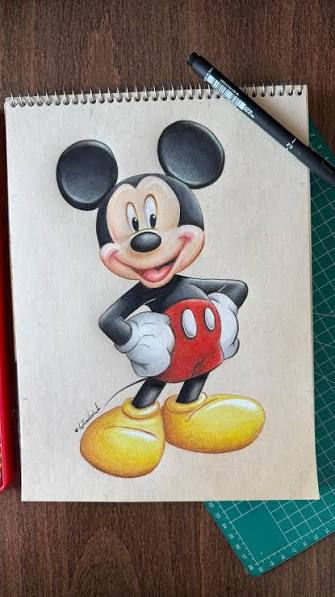
Creating a Mickey Mouse drawing is a fun and rewarding activity for artists of all skill levels. By starting with simple shapes, practicing basic proportions, and following step-by-step instructions, anyone can learn to draw this timeless cartoon character. Whether you’re sketching for fun, teaching children, or improving your illustration skills, regular practice will help you create more polished and expressive artwork over time.
